# Agent Integration Guide
> Give an external agent or CI runner a scoped StaticX token, project ID, and deployment contract so it can upload, deploy, and inspect a static site through the API.
Canonical: https://staticx.site/documentation/agents
Agent deployment
## Give an agent the same release contract your dashboard uses.
Agents should build locally, upload the output ZIP, publish, inspect logs, and return the live URL or the exact API error.
Auth
API token
Contract
/api/v1
Input
ZIP output
Dashboard path
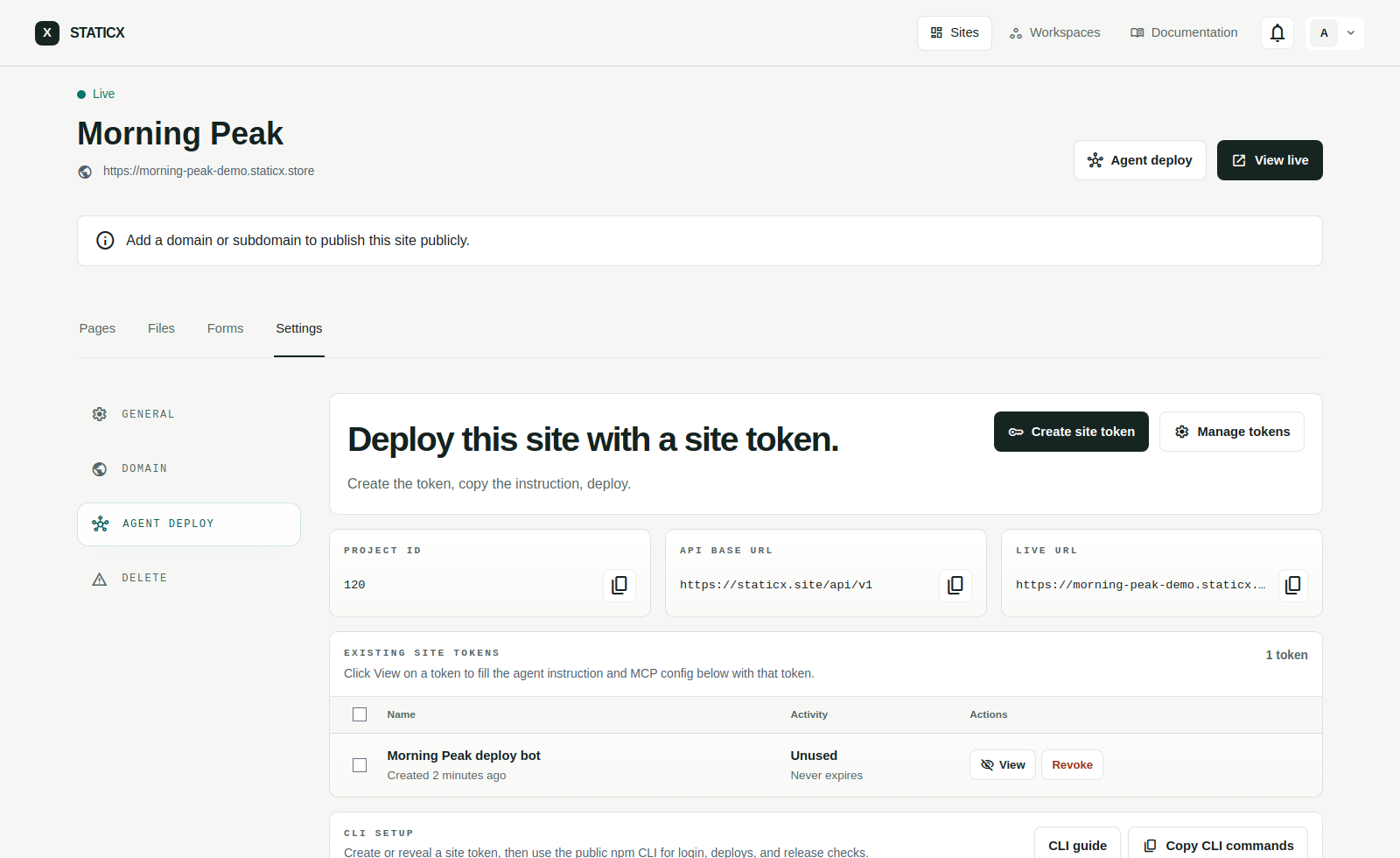
## Open Project Settings → Agent deploy.
The project page gives everything an agent needs: project ID, API base URL, current live URL, a generated token flow, the filled text instruction, and MCP config.
 Recommended setup
## Create one scoped token per agent or automation runner.
1. **Create a site token.** Use the project Agent deploy tab when the automation only needs one site.
2. **Default to Full access on that site token.** It covers upload, deploy, and logs for the site-scoped release flow.
3. **Escalate only when needed.** Move to a Workspace token only when the runner truly needs several sites inside one workspace, or to a Global token for broad internal operator flows.
4. **Store it safely.** The token is shown once. Put it in the agent environment or secret manager.
5. **Copy the project instruction.** The project tab fills in the project ID, base URL, and live URL.
6. **Run the deployment.** The agent should build, confirm `404.html`, zip, upload, deploy, and verify logs.
7. **Respect plan limits.** If the API returns `PLAN_QUOTA_EXCEEDED`, stop and show the exact error instead of retrying.
8. **Revoke when done.** Delete old tokens from the project page or from Settings to remove access.
CLI alternative
## Use the public npm CLI when the runner prefers terminal commands.
The site and workspace Agent deploy pages now expose both the text-only agent prompt and a ready-made CLI block with the same token scope.
```
npm install -g staticx
staticx login --base-url "https://staticx.site/api/v1" --token "STATICX_API_TOKEN"
staticx guide
staticx whoami
staticx deploy --site-id STATICX_PROJECT_ID --dir dist
staticx deploy --site-id STATICX_PROJECT_ID --dir dist --versioning off
staticx domain --site-id STATICX_PROJECT_ID --domain app.example.com
staticx domain-status --site-id STATICX_PROJECT_ID
staticx logs --site-id STATICX_PROJECT_ID
```
Scope guide
## Use the smallest scope that still lets the agent finish.
### Site token
Best default for one build pipeline or one deployment bot tied to a single site.
### Workspace token
Use only when one tool must create or update multiple sites inside one workspace. This is the right middle ground between one-site deploy bots and broad account automation.
### Global token
Reserve for broad internal tooling or admin-controlled workflows that must cross workspace boundaries, not routine deploy agents.
Copyable instruction
## Text-only agent prompt.
Use this format when the agent does not support MCP tools. Replace the token and project ID, or copy the filled version from a project page.
Instruction
```
Deploy `dist` to StaticX project `STATICX_PROJECT_ID` using `STATICX_API_TOKEN`.
Use:
- https://staticx.site/llms.txt
- https://staticx.site/llms-full.txt
- https://staticx.site/api/v1/openapi.json
Build, validate `index.html` + `404.html`, apply StaticX form rules if forms exist, zip `dist` root, upload, deploy, check logs, then return the live URL or the exact API error. Use `versioning_enabled=false` only when I ask for one baseline release instead of rollback history. Never expose the token.
Context:
- API Base URL: https://staticx.site/api/v1
- Authentication: Bearer STATICX_API_TOKEN
- Project ID: STATICX_PROJECT_ID
- Build output directory: dist
Endpoint reference:
- GET /projects/{project} - confirm project state.
- POST /projects/{project}/files - queue the build ZIP with multipart fields mode=zip, overwrite_confirmed=1, and archive=@site.zip.
- GET /projects/{project}/imports/status - poll until state=completed before publishing queued ZIP or URL imports.
- POST /projects - create a site. Optional `versioning_enabled=false` starts it with one baseline release instead of rollback history.
- POST /projects/{project}/deployments - publish. Default creates rollback-ready history; body `{"versioning_enabled":false}` keeps one baseline release.
- GET /projects/{project}/deployments - read release history or the baseline release.
- POST /projects/{project}/domain - start manual custom domain setup and return one DNS record when requested.
- GET /projects/{project}/domain - read custom domain activation status.
- GET /projects/{project}/logs - read project logs.
StaticX form rules:
- If forms exist, add data-staticx-form to each form that should collect entries.
- Use data-staticx-form-id="contacts" only when several pages should share one collection.
- Give every input, textarea, and select a stable name attribute.
- Keep the form as normal HTML. Do not wire it to a custom backend endpoint.
- Optional attributes: data-staticx-success-message, data-staticx-error-message, and data-staticx-redirect.
- Do not manually inject the StaticX script or action.
- After deployment, submit one test entry and confirm the collection appears in the Forms tab.
Plan limits:
- Free plan: 1 site, 500 MB total storage, 500 MB max upload, 1,000 form entries, 1 team seat, last 5 rollback versions.
- Plus plan: 15 sites, 10 GB storage, 50 GB max upload, 20,000 form entries, 5 team seats, last 10 rollback versions.
- Pro plan: 100 sites, 20 GB storage, 50 GB max upload, 100,000 form entries, 10 team seats, last 50 rollback versions.
- Unlimited plan: custom sites, storage, form entries, team seats, and rollback history, with 50 GB max upload.
- If the API returns PLAN_QUOTA_EXCEEDED, stop and return the exact message. Do not retry blindly.
Steps:
1. Build the project locally.
2. Confirm the build output contains index.html or index.htm plus 404.html at the root.
3. Zip the contents of the build output directory so those root files stay at the ZIP root.
4. Upload the ZIP with POST /projects/{project}/files using mode=zip, overwrite_confirmed=1, and archive=@site.zip.
5. If the upload returns status=queued, poll GET /projects/{project}/imports/status until state=completed. Stop on failed or stalled and return the exact message.
6. Deploy with POST /projects/{project}/deployments. Send versioning_enabled=false only when the user wants history off; new sites can also be created with versioning_enabled=false.
7. If the user wants a custom domain, call POST /projects/{project}/domain and return the DNS record to create.
8. If the user wants DNS Connect, explain that browser approval is required in the dashboard. Do not claim the agent can authorize an external DNS provider silently.
9. Check GET /projects/{project}/deployments and GET /projects/{project}/logs.
10. Return the live URL, domain instructions, or the exact API error message if deployment fails.
```
SEO & indexing
## Build sites that search engines (and StaticX indexing) can read cleanly.
StaticX can submit and check pages with SpeedyIndex. Help it by shipping search-ready HTML: keep indexable pages clean and unique, and explicitly mark the pages that must stay out of the index. Pages flagged `noindex` are skipped by StaticX page discovery and dropped from the indexing console.
### Keep non-indexable pages out of the index
Add `` in the `` of any page that should never appear in search results:
- 404 and other error pages.
- Thank-you / confirmation pages shown after a form submit.
- Login, signup, account, and other gated pages.
- Internal search-results pages.
- Paginated or filtered pages that duplicate content (or use a canonical instead).
### One clear identity per page
- One unique, descriptive `` and `<meta name="description">` per page.
- A self-referencing `<link rel="canonical">` on indexable pages; point duplicates at the canonical URL.
- Set the correct language with `<html lang="...">`.
- Avoid duplicate content; do not ship the same body under multiple URLs.
### Crawl & discovery files
- Generate a `sitemap.xml` listing only indexable pages — exclude every `noindex` URL.
- Ship a `robots.txt` and reference the sitemap from it.
- Keep URLs clean, stable, and lowercase; avoid query-string-only routing for content pages.
### Rich results & structure
- Add Open Graph (`og:title`, `og:description`, `og:image`) and Twitter card tags for shareable previews.
- Add structured data (JSON-LD) where relevant: Article, Product, Organization, BreadcrumbList, FAQ, etc.
- Use semantic headings with a single `<h1>` per page and a logical `h2`/`h3` hierarchy.
- Give every meaningful image descriptive `alt` text; optimize images for fast loading.
Programmatic indexing
## Submit and check pages with SpeedyIndex over the API, CLI, or MCP.
The same indexing flow the dashboard uses is exposed on the token-authenticated `/api/v1` API. The SpeedyIndex key is account-wide, stored encrypted, and never returned by any surface. `google` and `yandex` support both submit (indexer) and check (checker); `bing` is check-only. See the [API reference](https://staticx.site/documentation/api), [llms-full.txt](https://staticx.site/llms-full.txt), and [openapi.json](https://staticx.site/api/v1/openapi.json) for the full schema.
### API endpoints
- `GET /indexing/balance` — account SpeedyIndex token, indexer, and checker balance.
- `GET /indexing/pages` — inventory rows, metrics, trend, and pagination (`engine`, `status` incl. `all`, `site`, `workspace`, `page`).
- `POST /projects/{project}/indexing/submit` — submit URLs for indexing; omit `urls` to submit the sitemap diff.
- `POST /projects/{project}/indexing/check` — check index status; omit `urls` to check the whole inventory.
- `GET /projects/{project}/indexing/tasks` and `.../tasks/{task}` — list tasks and read per-URL reports.
### CLI commands
```
staticx indexing balance
staticx indexing pages --engine google --status not_requested
staticx indexing submit SITE_ID # sitemap diff
staticx indexing submit SITE_ID https://site/a https://site/b # specific URLs
staticx indexing check SITE_ID # whole inventory
staticx indexing tasks SITE_ID
staticx indexing task SITE_ID TASK_ID
```
### MCP tools
- `staticx_indexing_balance` — read SpeedyIndex balance.
- `staticx_indexing_pages` — list inventory (engine `google|yandex|bing`, status incl. `all`).
- `staticx_indexing_submit` — submit URLs or the sitemap diff (`type` `indexer|checker`).
- `staticx_indexing_check` — check URLs or the whole inventory.
- `staticx_indexing_tasks` / `staticx_indexing_task` — list tasks and per-URL reports.
### Error codes
Every error returns `{ "message", "error_code" }` with the matching HTTP status. The CLI maps each code to an actionable message and a non-zero exit code; the MCP server surfaces the `error_code` plus guidance.
- `no_key` (401) — no SpeedyIndex key connected. Add one in **Settings → Indexing** (stored encrypted).
- `insufficient_balance` (402) — not enough credits. Top up the SpeedyIndex balance, then retry.
- `rate_limited` (429) — rate limited. Wait a moment and retry.
- `engine_unsupported` (422) — unsupported engine/task type (for example, Bing is check-only). Return the message.
- `server` (502) — upstream SpeedyIndex failure. Wait and retry.
Agent rules
## What the agent should and should not do.
### Do
- Build the project locally before upload.
- Make sure `index.html` or `index.htm` and `404.html` are both at the build output root.
- Zip the build output contents so those required files are at the archive root.
- Deploy directly with `POST /projects/{project}/deployments` after uploading the ZIP.
- Respect deployment history mode: default creates rollback-ready releases; `versioning_enabled=false` keeps one baseline release for analytics and forms.
- Read deployments and logs before reporting completion.
- Stop on `PLAN_QUOTA_EXCEEDED` and suggest cleanup or upgrade.
### Do not
- Do not report success after a failed upload or deployment.
- Do not guess the output directory if the user gave a specific path.
- Do not bypass plan limits by changing endpoints or form handling.
- Do not expose tokens in commits, public logs, or screenshots.
- Do not bypass the documented API contract.
[View on staticx.site](https://staticx.site/documentation/agents)